Beware of fake job offers and payment requests. We only use official email IDs and never conduct interviews on messaging apps.Beware of fake job offers and payment requests. We only use official email IDs and never conduct interviews on messaging apps.
Summary: Alt text, commonly referred to as alternative text, is an important aspect of SEO and website accessibility. Learn how to create effective alt text for images that not only improves search engine results but also the user experience. Gain suggestions and best practices tailored to businesses in 2024.
Key takeaways:-
Alt text or alternative text describes the purpose or appearance of an image on a webpage. It provides context to search engines as they crawl through your website.
Some alt text best practices include using concise yet descriptive text and adding keywords to your alt text.
Using multiple keywords or too much jargon makes it harder for search engines to crawl the images on your site.
Use the right details and specifics – such as names of people, places or monuments – while adding descriptions to images.
Make sure you don’t use phrases like ‘This is an image of’ as the search engine already knows it is crawling an image.
Table of Contents
What is Alt Text
Alternative text, or alt text for short, is the description of an image’s function or appearance as a user sees it on your webpage. If an image fails to load on the screen, the alt text shows up to give you an idea of what the image was. Screen readers for visually impaired users also read your alt text aloud for users with low or impaired vision. Therefore, the perfect alt text should help users visualize the image along with the people/person and things being shown. Also known as alt attributes and alt tags, alt text is generally implemented within the specified field marked in a content management system or within the HTML code.
Generally, an alt description would look something like this:
Benefits of Alt Text:
Many business and website owners still don’t use alt tags on their websites. It might seem like a small ‘take it or leave it’ move, but its impact is manifold and long-lasting.
1. Improves website accessibility: Using alt tags on your website images makes your website more accessible for visually impaired users. These users access screens using screen readers, and without alt text, they might not be able to understand what an image is about.
2. Improves UX when the internet is slow: If your internet connection is unstable or the web page doesn’t load properly, images often don’t load. In such a case, the alt text will show up to give users an idea of the image that they’re unable to see.
3. Improves crawlability: Search engines get better context to an image when there is an attached alt description with it. This allows it to rank and index images properly for accurate image SEO, while providing contextual data about the image.
Discover What Your Customers Search ForDiscover What Your Customers Search For
Get insights on evolving customer behaviour, high volume keywords, search trends, and more.
The internet and all its websites offer a highly visual experience. You will rarely find a website today comprised of only text, without any graphic elements or visuals. Plus, more digital content is being upgraded to images or other visual formats. This makes alt text almost fundamental to your website.
Alt text helps translate the content of an image into words, making it more easily accessible to larger audiences including people with visual disabilities, as well as search engine bots and crawlers that are still not smart enough to completely understand all contexts, visuals and meanings. Effective alt text is a key component of on-page optimization as it contributes to better search engine rankings and user experience.
How to Write Alt Text – Best Practices for SEO
By now you have understood that there are several reasons to add alt text to your images. But is there a specific way to write alt text to optimize crawlability and accessibility?
While there is no one right way to do it, here are the best SEO best practices to help you optimize your website with the perfect alt text.
1. Add alt text to the right types of images:
The first rule is never to write alt text for the sake of writing. It’s more useful to use a null alt attribute that tells users and the search engine to ignore that image. If you leave out the alt tag entirely instead of using a null alt attribute, image readers might read out the file name of the image instead.
However, wherever alt text adds meaning for the user, make sure you add it. This could mean:
Screenshots of text-based posts from social media or other platforms
Icons that represent functionality like shopping carts
Photographs that show comparisons such as differences between 2 phones
2. Be concise but descriptive:
While writing alt text, the rule of thumb is ‘this is the most concise description of the purpose of the image on your website. The context important for the image changes according to the purpose of your website. Thoughtful alt text can enhance your website’s visibility in search engines and aid users searching for SEO services.
For example, consider a picture of a man working out. At first glance, it might seem sufficient. But for an image leading to a complete workout guide or on a page talking about the importance of fitness, the description is incomplete.
3. Write like you talk:
While writing alt text, keep in mind how you would talk about this image to someone during a conversation. It doesn’t need to be long or pretentious. Some of the things you should NOT add to your alt text are:
Copyright information. Save it for the caption.
Phrases such as ‘photo of’ or ‘image of’
Information that is critical to the reader. Include this in the website text content instead.
Information that you’ve already mentioned in the text, headline or caption.
4. Include keywords in your alt text:
If you are trying to get your content to rank in Google search results, add keywords to your alt text to improve crawlability and indexing. For example, if you have an infographic on the importance of SEO services, use the relevant keywords in the alt tag to improve your appearance and ranking on Google as well as Google Image search.
What is Alt Text in WordPress:
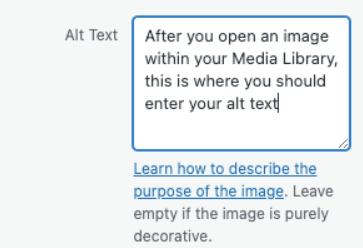
Uploading content on your owned WordPress domain gives you more control over the content you create, upload and share. While uploading images on WordPress, you can edit its metadata, alt text and much more. You will see a menu like this below the image preview before you upload an image.
There are several alt text combinations that you can try. However, you should try to stick to simple terms that a user would search for. This makes it much easier for search engines to identify the intent of your content and match it with the end user’s search intent.
For example, in the image above, the alt text ‘car modification’ or ‘car mods’ will be much more effective for search optimization than ‘yellow car with door open’.
How to Write Alt Text for Different Platforms
1. Alt Text in WordPress:
In WordPress, you can easily add alt text when uploading an image. Make sure to add concise, keyword-optimized alt text in the designated field.
Example: For a product image on an e-commerce site, instead of alt=”Shoes”, use alt=”Black leather dress shoes for men, size 10″.
2. Alt Text for E-Commerce Platforms:
In e-commerce, alt text can influence product search rankings. Ensure your alt text is product-specific and includes relevant keywords users are likely searching for.
Common Mistakes to Avoid While Writing Alt Text
1. Leaving Alt Text Blank:
Missing alt text is a missed opportunity for both SEO and accessibility. Always include alt text for meaningful images.
2. Being Too Vague:
Alt text should provide specific context about the image. Avoid vague descriptions like alt=”group of people”. Instead, add context, such as alt=”Team of employees collaborating during a business meeting”.
3. Misleading Alt Text:
Make sure the alt text accurately reflects the image. Misleading alt text can confuse both users and search engines.
Examples of Good and Bad Alt Text:
1. Using keywords vs details:
Consider this image on a coworking space’s home page.
Bad alt text:
alt=”Five people talking to each other in an office space”
While this text gives the information you need, it has too much specific information and not enough context to be relevant to a search engine. The audience you are targeting is searching with a different intention, which is to find a large enough space to work from. You should also be aware that Google often penalizes websites for stuffing too many keywords into content and alt tags. Therefore, if you are targeting the owner of a small business searching for a coworking space, you should include a few more specific details.
Good alt text:
alt=”large coworking space for small and medium businesses”
2. Using details vs specificity:
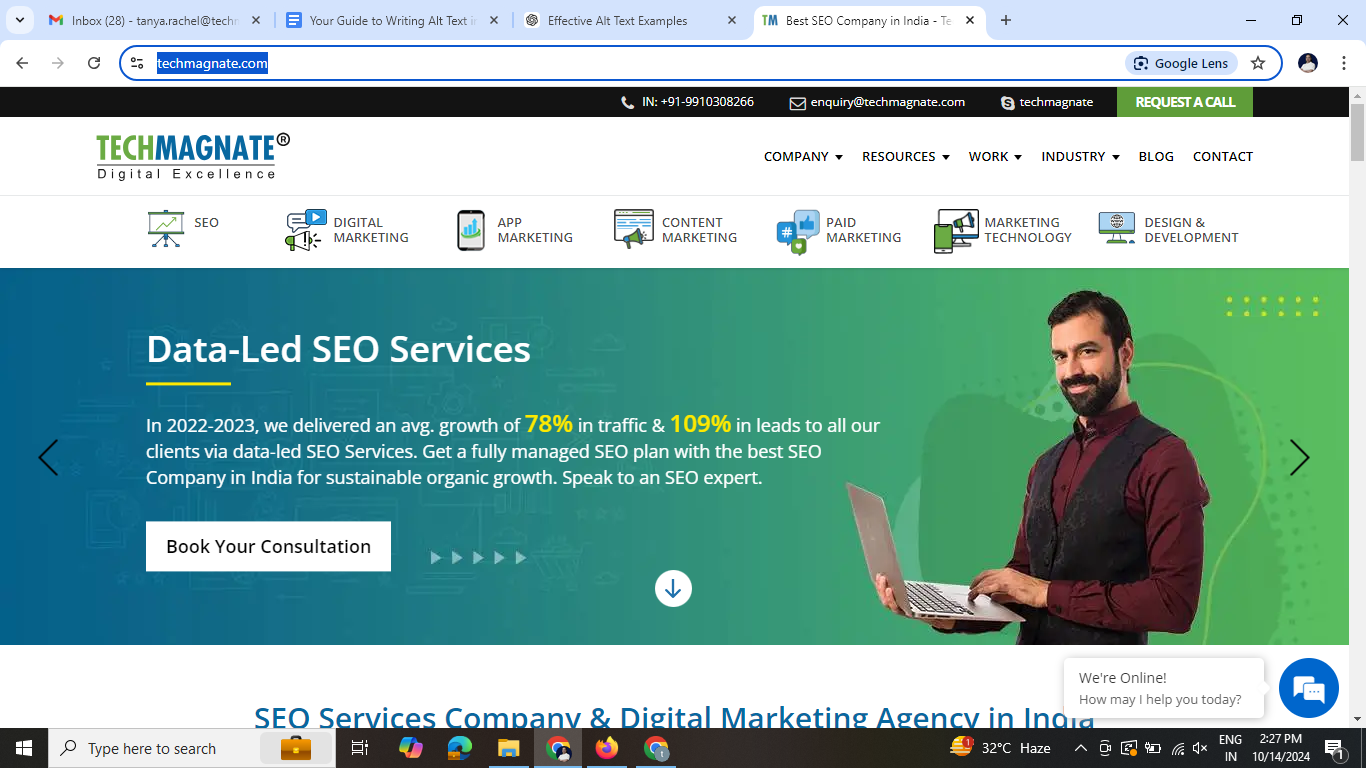
Consider the following image on Techmagnate’s website homepage.
Bad alt text: alt=”Homepage”
Let’s assess this image and its alt description. While this description is concise, it lacks the necessary details that convey the image’s context. A visitor coming to the Techmagnate homepage is likely seeking insights about digital marketing services, particularly SEO services. Thus, merely stating it as a homepage image does not address the user’s intent or the specific content being presented.
To better cater to the needs of potential clients, we can enhance the alt description by incorporating relevant details that highlight the services and the benefits they offer.
With this in mind, let us rewrite the alt description for this image.
Good alt text: alt=”Data-Led SEO Services”
Notice the difference? The improved description is more detailed and accurately reflects what the image depicts.
3. Using specificity vs context:
Take a look at the following image from a business school website.
Bad alt text:
alt=”woman pointing to a computer screen”
In most other contexts or a website with stock footage, this text would be decent. However, since the objective is to publish this image on a landing page about attending business school, several keywords and phrases can make this image more descriptive. These keywords could help Google relate the image with other sections of the article too.
Good alt text:
alt=”business school professor helping a student during class”
Alt Description Writing Tips:
Now that you know where to use keywords, details, specificity and context, take a look at these tips on how to write alt text correctly and fulfill the purpose of the image.
1. Don’t stuff keywords when you’re writing alt text. It won’t improve your SERP ranking and could attract penalties.
2. Add sufficient details without making the alt text too long. Always try to avoid multiple sentences while adding alt text.
3. Use keywords in a way that appears natural while writing an alt text. If the targeted keyword doesn’t fit in the description, avoid it entirely.
4. Using text ON the image is not the same as using alt text. All alt text must be added to the HTML code.
5. Whatever your image may be, make sure the user can identify and visualize the content of the image just by reading the alt text. This rule is the best method to ensure your alt text is apt.
Take the First Step Towards Content Optimisation!
And there you go. That’s everything you need to get started. Take the first step by performing a basic content audit to understand where you can add or improve the alt text on your existing images. Our SEO experts with nearly two decades of experience can help optimize your website’s content and images to give measurable results and move your SEO strategy forward.
Frequently Asked Questions (FAQs)
Does missing alt text affect website accessibility?
Yes, missing alt text can make your site less accessible to screen readers and users with visual impairments.
Is there a character limit for alt text in SEO?
While there’s no official limit, it’s best to keep alt text under 125 characters for readability and screen reader compatibility.
Should decorative images have alt text?
No, purely decorative images should have empty alt attributes (alt=””) to help screen readers skip them.
Can I use the same alt text for multiple images?
It’s best to write unique alt text for each image to provide accurate context and improve SEO performance.
What’s the difference between alt text and image title?
Alt text is for accessibility and SEO, while image titles are optional and mainly used for hover-over tooltips.
Neha Bawa is the Director of Brand Marketing at Techmagnate. She has worked in Digital Marketing since 2012 and has specialised in content creation. She has earned a Master’s degree in Interactive Communications from Quinnipiac University in Connecticut, U.S.A. Her interests lie in creating great content, docs, and working towards sustainability through biodiversity.
Get the most valuable search related insights about leading brands, trending keywords, search volumes, fastest growing categories, city-level insights and much more!
It has come to our notice that fraudulent job offers are being circulated on the internet through messaging apps like WhatsApp and Telegram, which falsely claim to be from Techmagnate. We take this matter seriously and would like to caution all candidates to be wary of such postings.
Please Note That –
We do not charge any fees/security deposit/payment from candidates, irrespective of the professional experience they hold, for job applications or interviews
Official communication channels include our website and verified social media accounts, primarily LinkedIn.
Kindly double-check the domain name – @techmagnate.com – in the email address
We follow a transparent and ethical approach for hiring/onboarding supported by proper documentation.
Ensure that you only apply through verified channels to avoid being scammed. We also recommend that you exercise caution when sharing personal information or financial details with any job posting or recruitment agencies claiming to represent us.
We want to ensure that potential candidates interested in joining Techmagnate have a safe and positive experience.
If you find that someone that fits the description above has reached out to you, please notify us immediately at jobs@techmagnate.com.
 Important Alert:
 Important Alert: